Try the Best Video Downloader Now!
100% Secure. No virus.
100% Secure. No virus.
Share this article:


If you’ve ever wished you could save a YouTube video for offline watching, reuse a clip in your project, or study a tutorial without buffering, you are actually on the right post for it. Because nowadays, downloading online videos is more common than ever, and surprisingly, the process of downloading 4K videos on YouTube is now simple to do. In line with that, we are here to give you the process of doing it so that you will not have a hard time. Shall we start the guide now? Let us dig deeper into it here.
If you're looking for an all-in-one solution for video downloading, StreamByte for Video offers excellent features to download your videos on YouTube up to 8K resolution. Unlike the typical YouTube downloader, StreamByte for Video is a powerful, dedicated video downloader platform. In connection with that, this tool offers a useful feature that we can enjoy for free. Some of these features are presented below:
Key features of StreamByte
Steps to Use StreamBytes
Let us now see its capabilities via its effectiveness and efficiency. We will show you the steps in using StreamBytes to download 4K YouTube videos. Please see the steps below:
Step 1. Go to the official website of StreamBytes, then download StreamBytes for Video for free. After that, immediately install the software on your computer.
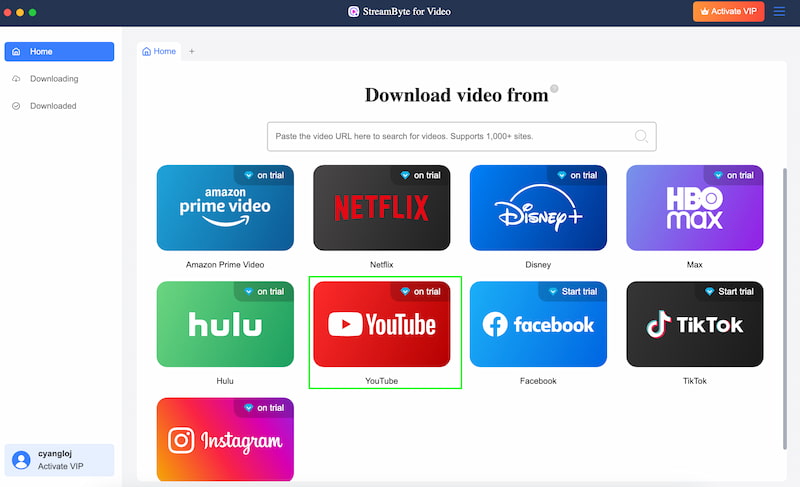
Step 2. Launch the tool on your computer. From the main interface, choose YouTube among the options on the screen.
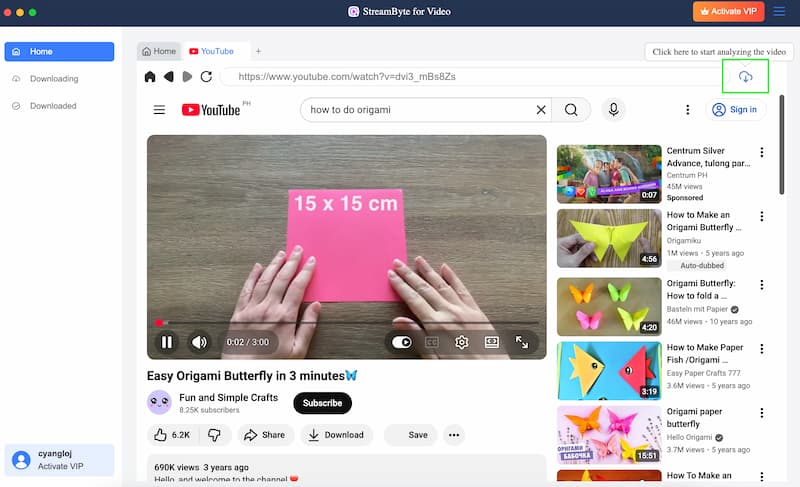
Step 3. Proceed searching the video you would like to download in 4K. Please play the video. On the top-right corner of the screen, you may now click the Download icon. The tool will now analyze the video you have chosen. Wait for a while, and your video shall now be downloaded.
Definitely easy to do, right? That is the power of StreamBytes in terms of downloading a 4K video from YouTube. You can see that the tool is easy to use. More than that, it is very effective. Get the tool now for free and follow this guide whenever you would like to do it.
Another method we can follow is downloading 4K YouTube videos with online tools. In this case, an online tool such as MP3 Juice can help us do the process with ease. It is like a copy, paste, click process. One great advantage of an online tool is the fact that it is a more straightforward download process. That means, no need for an installation for a software on your computer. Let us see what it has for its users.
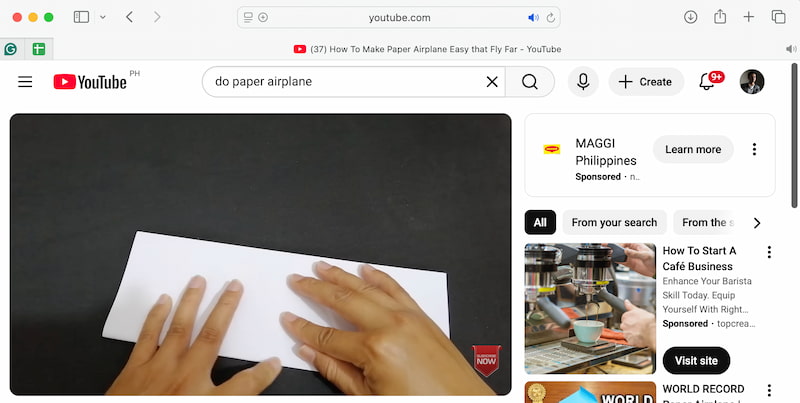
Step 1. Go to YouTube and search for the video you want to download. Please copy its URL.
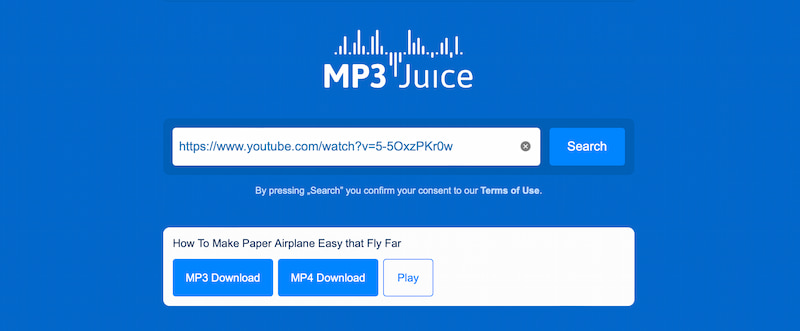
Step 2. At this moment, please access the MP3 Juice site on your browser. Paste the URL under the tab and click MP4 as a format.
Step 3. Now choose the resolution you need for this video and proceed with the Download button.
With this step, we can say that downloading 4K YouTube videos using online tools like MP3 Juice is simple and fast, requiring just a few clicks. While resolution options may be limited compared to desktop software, this method is ideal for users who want a quick, no-install solution for offline viewing. It’s efficient, beginner-friendly, and perfect for casual downloads.
Another method we can follow is a popular and potent Chrome extension for downloading YouTube videos, called Video DownloadHelper. It supports HD quality downloads and allows you to download videos in a variety of formats, including MP4, FLV, and WebM. This addon is a versatile choice because it may download videos from numerous websites in addition to YouTube. For users who download frequently, it offers a time-saving option with features like batch downloading that allow you to download multiple videos at once. Similar with an online tool, this is also a great option because there is no need for a software to be downloaded.
Step 1. Install Video DownloadHelper from the Chrome Web Store.
Step 2. Open YouTube and play the video you want to download. Click the Video DownloadHelper icon in the toolbar.
Step 3. Choose the video format and quality. Then, please wait for the download to finish, and then watch offline.
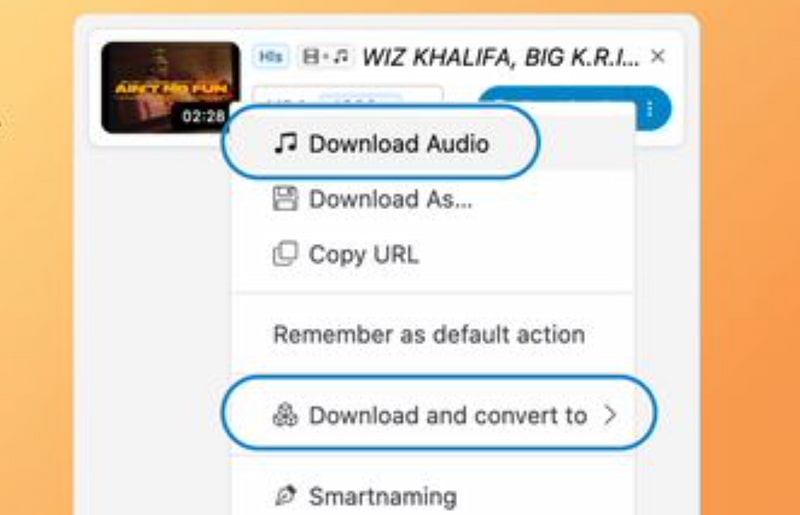
Downloading YouTube videos in high quality, including 4K, has become common for offline viewing, content creation, and educational purposes. However, not all tools work the same way. Some are full software programs, while others are online websites or browser extensions.
Each option has its own strengths in terms of quality, speed, ease of use, and safety. To help you choose the right solution, here is a comparison of StreamByte as the software, MP3 Juice as the online tool, and Video DownloadHelper as a browser extension based on seven important factors.
| Features | StreamByte (Software) | MP3 Juice (Online) | Video DownloadHelper (Browser Extension) | 4K YouTube Downloader Tools |
| Platform Type | Desktop software for Windows and Mac. | Web-based online tool. | Browser extension for Chrome and Firefox. | Desktop software. |
| Supported Formats | MP4, MKV, AVI, MOV, MP3, etc. | Mainly MP3, limited MP4 | MP4, WEBM, MKV, others | MP4, MKV, FLV, MP3, etc. |
| Maximum Video Quality | Up to 4K and sometimes 8K | Usually limited to 720p or audio only | Up to 4K (depends on site and browser) | Designed for 4K and higher resolutions |
| Download Speed | Fast and stable (uses system resources) | Medium, depends on internet and server load | Medium to fast, depends on browser performance | Fast, optimized for large video files |
| Ease of Use | User-friendly interface but needs installation | Very easy, no installation required | Easy, but requires browser setup | Easy, but requires installation |
| Safety & Ads | Generally safe, no ads if from official site | Often contains ads and pop-ups | Safe, but depends on permissions granted | Usually safe if downloaded from official sites |
| Best For | Users needing high-quality video and batch downloads | Quick audio downloads and casual users | Quick video grabbing while browsing | Professionals and users who frequently download 4K videos |
Q: Can I really download YouTube videos in 4K quality?
As long as the original video was submitted in 4K, you can download YouTube videos in 4K. Compared to internet applications or addons, you have more control over resolution and quality when you use a dependable desktop program like StreamByte for Video.
Q: Is it legal to download 4K YouTube videos?
YouTube videos can typically be downloaded for offline, personal use, such as watching without an internet connection or for educational purposes. However, it may be against YouTube's rules and copyright laws to distribute or use downloaded videos for commercial reasons without permission.
Q: Why can’t some online tools download videos in 4K?
Because of server limitations or ad-based business strategies, many online downloaders have resolution limitations. For real 4K downloads, StreamByte for Video is the best Youtube downloader because it can cap downloads at 720p or 1080p.
Q: When downloading 4K YouTube videos, which format works best?
Because MP4 offers excellent quality and is compatible with the majority of devices, including computers, smart TVs, and smartphones, it is the most preferred format.
Q: Are 4K downloads supported by browser extensions?
While some browser extensions allow HD downloading, there isn't much reliable 4K support. Offline software is still the best option for reliable and high-quality 4K videos, but extensions are handy for speedy downloads.
Downloading 4K YouTube videos is no longer complicated, even for beginners. Whether you prefer a powerful offline solution like StreamByte for Video, a quick online tool, or a handy browser extension, each method has its own advantages depending on your needs. If video quality and stability matter most, desktop software is clearly the best option. By choosing the right tool and method, you can enjoy crystal-clear 4K videos anytime, anywhere—without buffering or internet limits.
StreamByte for Video
Best video downloader to save videos from various streaming media effortlessly.
Charlotte Taylor is a content creator specializing in evaluating and analyzing various video download tools. Concerned about the technological trends of mainstream platforms such as YouTube, HBO, and Hulu, she conducts in-depth research on the functionality, compatibility, and usage limitations of video downloaders.
With rich experience, she has written a number of practical tutorials and reviews, helping users choose the most suitable video storage solution. In content creation, she tends to be user-friendly and practical-oriented, and she does well in explaining technical details in a simple way. Whether you are an ordinary user or a beginner, you can receive reliable guidance from her posts.

Expert who supports offline videos from streaming media.
SubscribeCopyright © 2026 StreamByte. All rights reserved.



Subscribe to get StreamByte upgrades, guides, discounts and more in the first moment.
Invalid Email Address.