Try the Best Video Downloader Now!
100% Secure. No virus.
100% Secure. No virus.
Share this article:


We all know that MKV, also known as Matroska Video is a popular format that is very versatile, also an open-source container which allows unlimited audio, video, picture, and subtitle tracks storage. This includes multiple languages and subtitle formats within a single file. Basically, it is designed for archiving, streaming, and preserving high-quality media. That is why some users want an easy MKV video, even after downloading from YouTube, for their video to watch, or videos that can be used for editing video. Good thing this article exists, because we will help you in achieving and getting the MKV you need from YouTube. Without further ado, here is the simple process on how we can concert YouTube Video to MKV.
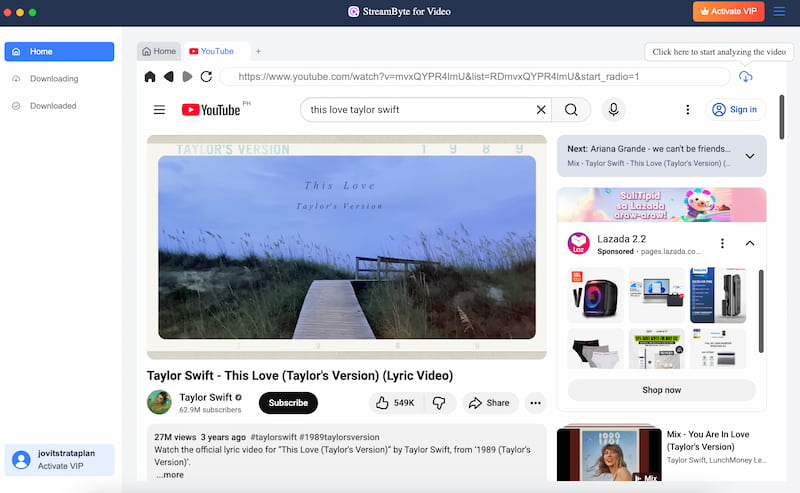
The first option we have is to use a professional YouTube downloader first. Because often, these kinds of tools can give a great quality of video up to 8K resolutions. One of the best tools to use is the amazing StreamBytes for Video tool. It is a great video downloader for every platform. Thus, one thing you could expect from this tool is the resolution when you are done downloading your videos from YouTube. In addition, the tool is pretty simple to use, so you will not have a problem with the process. To see its effectiveness, here is a simple process you can follow to download a YouTube video to MKV with higher resolutions.
Step 1. Download the incredible tool of StreamBytes now for free. Just go to their official website. Then install it immediately on your computer.
100% Secure. No virus.
100% Secure. No virus.
Step 2. Open the tool and see its main interface. From there, access the YouTube platform.
Step 3. Search for the video you would like to download. Play it and click the Download icon above. Please wait for a few seconds, and your video will be available in higher quality.
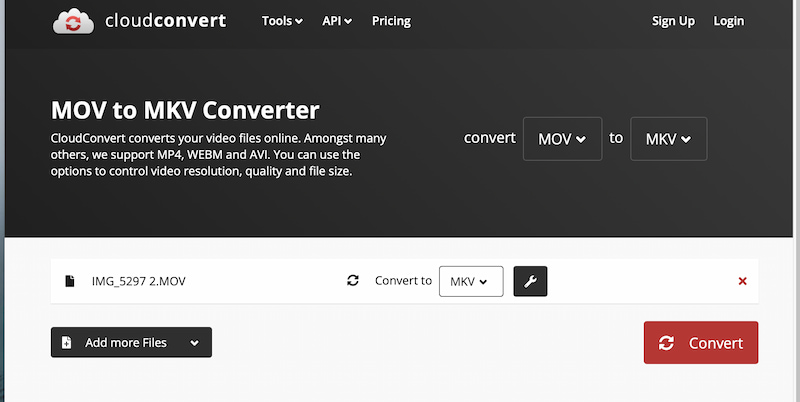
Another method we can use to make the YouTube video turn into MKV is by converting it using a free online conversion tool. In this case, we can use CloudConvert online for free. This tool is known to be great when it comes to supporting different formats in conversion. All you need to do is access their official website and upload your video. For a detailed process, see the steps you need to follow below:
Step 1. Access the official website of CloudConvert and upload the video you downloaded from YouTube. Ensure that the format is MP4 to MKV.
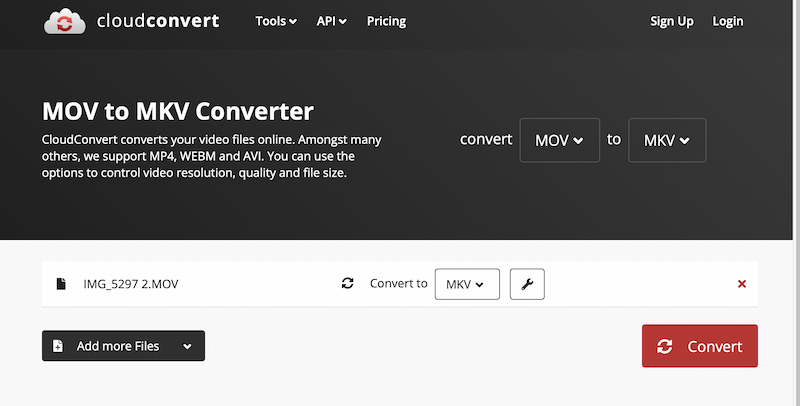
Step 2. After that, please click the Convert button, then wait for a couple of minutes for the next step.
Step 3. Next, click the Download button as you get the output with ease.
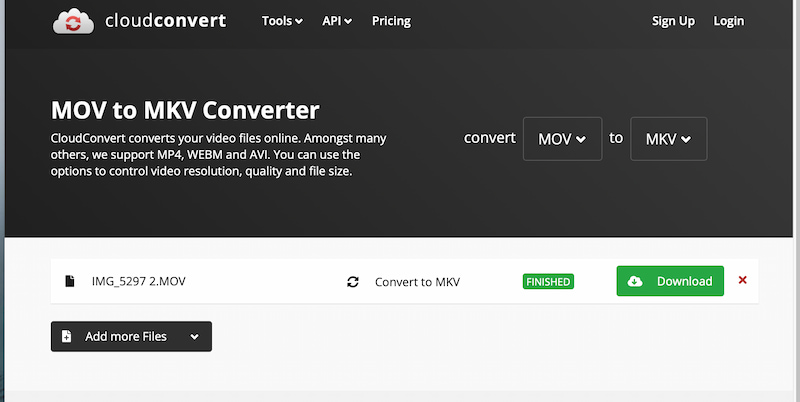
We can see that CloudConvert really does great in helping us convert YouTube videos to MKV format with ease using an online tool. As long as you follow each step above, you will definitely not experience a problem.
Now, let us convert YouTube to MKV for free using one of the open-source tools available on GitHub to help you. However, you need to keep in mind that this can be challenging for some of the users. In this scenario, let us use youtube-dl which is popular for being a command-line program. The good thing about this is the fact that it can convert videos from YouTube to MKV by bypassing DRM protection. Yet, if you are not familiar with coding, this method will be a hard option for you. Let us see why below:
Step 1. Download YouTube-dl from GitHub. You can do it by clicking Code and seeing Download ZIP. Then, please copy the URLs from the YouTube video you want.
Step 2. Next, Open Command Prompt to type the folder location where you can see the downloaded YouTube-dl.
Step 3. Now, enter the command line like: youtube-dl -f mkv video URL. Also, you need to replace the video URL with the actual URL you just copied. Finally, press the Enter key on your keyboard to start the YouTube to MKV conversion.
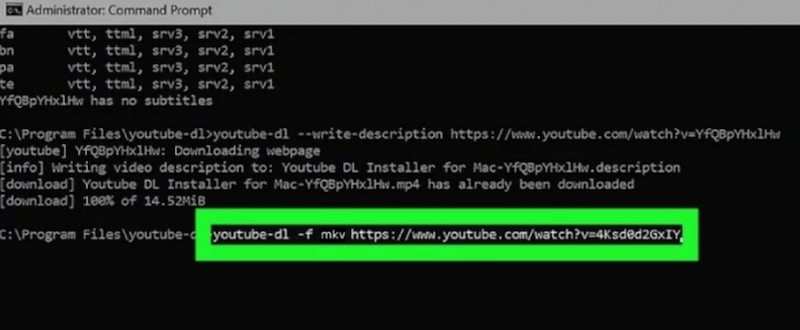
Having a browser plugin to make Youtube video to the MKV format is also another great idea to do. We can see above that it is possible as long as you are familiar with code.
If you only have your Android phone and need to do the YouTube to MKV conversion, then we have a great method for you. You can get the 4K Youtube Downloader for Android app, which can enable you to get the YouTube video you want to MKV with ease. This app can handle 360p to 8K video resolutions. Let us try it to see its effectiveness.
Step 1. The first thing we need to do is to install 4K Video Downloader on your Android, then immediately open the APK.
Step 2. After that, please copy the YouTube video URL and directly tap the Paste Link icon.
Step 3. Now, select MKV as the output format and also the video resolution you like, from 360p to 8K. Now, click Download, and the YouTube video will be converted to MKV directly.
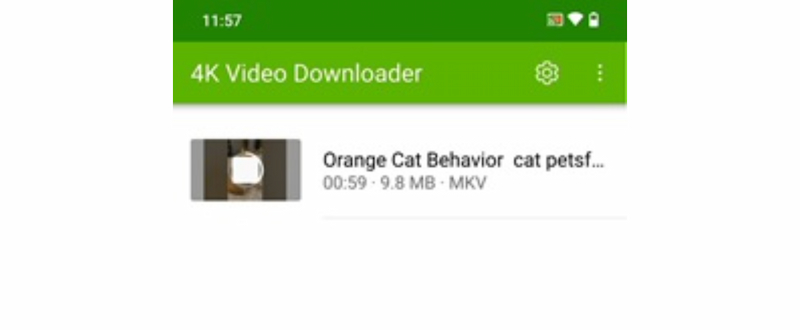
Your Android is also useful when it comes to making YouTube videos in MKV format. You only need the right app to do it, just like what we did above.
Let us now go through the process of converting the video from YouTube to MKV using your iPhone. You can use the amazing Video Converter and Compressor on your iPhone by downloading it from the App Store. This application has a double purpose. That means every video you downloaded on YouTube can now be MKV format with this app. See the steps below:
Step 1. Open the app on your iPhone and select the video from YouTube that you would like to download.
Step 2. After that, see the video and select the MKV format as the file format output.
Step 3. Finally, click the Convert button and wait for a few moments to see the outcome.
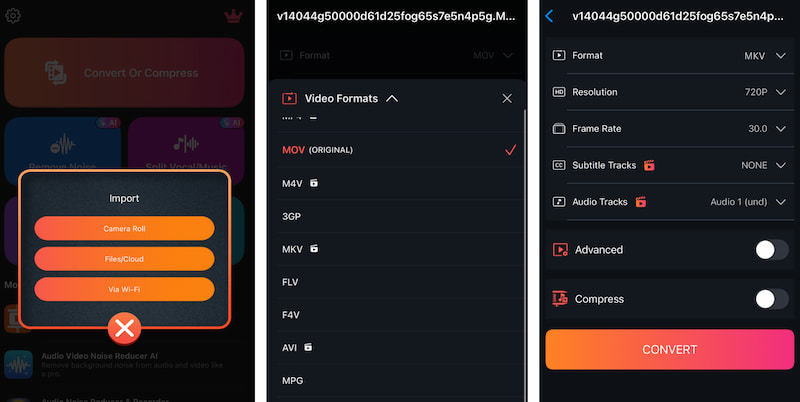
If you are an iPhone user, you see that having a Video Converter and Compressor app can really help us convert YouTube videos to MK format.
Converting YouTube videos to MKV is a great way to preserve high-quality content with flexible audio and subtitle support. As shown in this guide, you can choose from professional tools like StreamBytes for the best resolutions, free online converters such as CloudConvert, open-source options like youtube-dl, or convenient mobile apps for Android and iPhone. With these methods, anyone can easily download and convert videos into MKV format for smoother playback, editing, or long-term media storage.
StreamByte for Video
Best video downloader to save videos from various streaming media effortlessly.
Charlotte Taylor is a content creator specializing in evaluating and analyzing various video download tools. Concerned about the technological trends of mainstream platforms such as YouTube, HBO, and Hulu, she conducts in-depth research on the functionality, compatibility, and usage limitations of video downloaders.
With rich experience, she has written a number of practical tutorials and reviews, helping users choose the most suitable video storage solution. In content creation, she tends to be user-friendly and practical-oriented, and she does well in explaining technical details in a simple way. Whether you are an ordinary user or a beginner, you can receive reliable guidance from her posts.

Expert who supports offline videos from streaming media.
SubscribeCopyright © 2026 StreamByte. All rights reserved.



Subscribe to get StreamByte upgrades, guides, discounts and more in the first moment.
Invalid Email Address.